
Claude Code vs Cursor: The Ultimate Comparison
Claude Code vs Cursor in 2026: compare workflow, agents, pricing, and why LLM Stats Playground is the fast, affordable coding choice.

The Verdict
Choose LLM Stats Playground for fast, affordable coding. It is the strongest option for building web apps, comparing top coding models, and turning prompts into deployable sites or finished business files.
Cursor is the stronger fit for large teams that want a complete editor, fast autocomplete, inline changes, codebase search, agents, a built-in browser, model choice, centralized controls, and a clean handoff from local work to cloud agents.
Claude Code is the terminal-first choice. It reads and edits files, runs commands, coordinates custom subagents, connects to external tools through MCP, and lets hooks enforce your workflow. With Claude Opus 4.8 dynamic workflows, it can plan and verify codebase-scale migrations through hundreds of parallel subagents.
LLM Stats Playground is our overall choice when speed and affordability matter. Describe a site, run it in a hosted sandbox, inspect the preview, deploy it, or create a document, spreadsheet, slide deck, database, or LaTeX project without local setup.
What Claude Code and Cursor Actually Are
The old shorthand was simple: Claude Code is a CLI, Cursor is a VS Code-style editor. That is no longer complete. Claude Code now runs in the terminal, IDE, desktop app, and browser. Cursor 3 combines its editor with a unified workspace for local and cloud agents, including sessions launched from web, mobile, Slack, GitHub, and Linear.
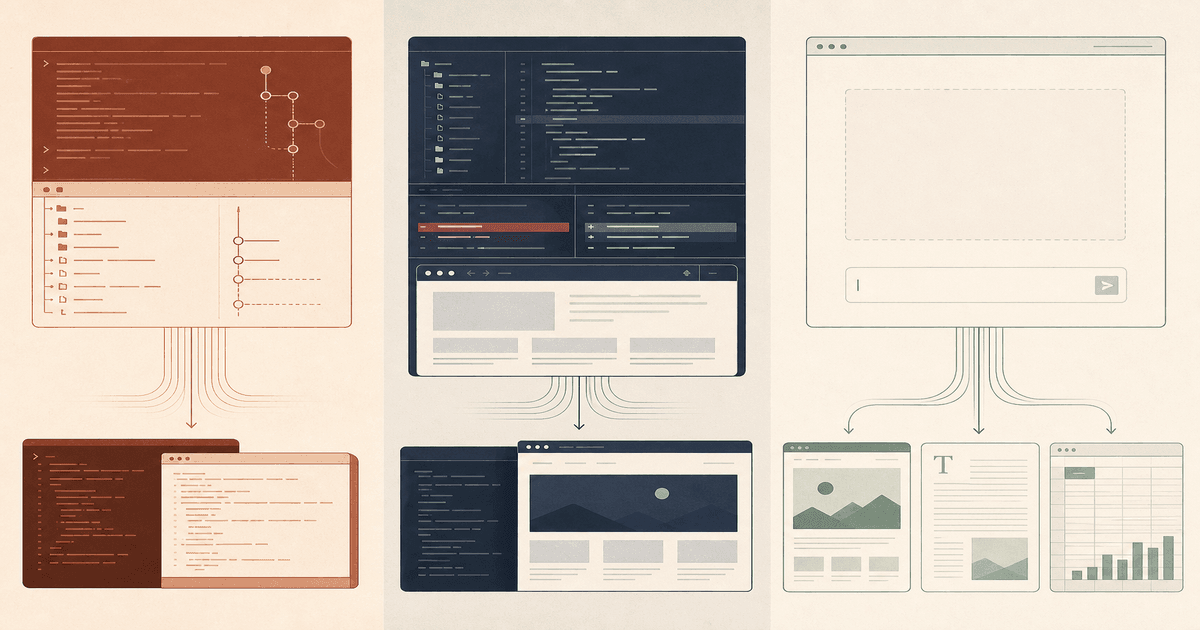
Their centers of gravity still differ. Claude Code treats the repository, shell, and agent runtime as the primary interface. Cursor treats the editor as the primary interface and makes agents another way to manipulate the code around you. The Playground treats the requested artifact as the primary interface.
Three starting points
Repository → editor → outcome
One edits your repo. One surrounds it. One starts without it.
Claude Code
The terminal is the product.
- 01
Start
Open an existing repository
- 02
Work
Read files, run commands, coordinate Claude agents
- 03
Finish
Tests, commits, migrations, and reviewed diffs
Cursor
The editor becomes an agent workspace.
- 01
Start
Open, index, or clone a repository
- 02
Work
Edit inline, chat, test in browser, delegate to cloud
- 03
Finish
Local changes or merge-ready pull requests
LLM Stats Playground
The browser starts with the outcome.
- 01
Start
Describe a site, document, sheet, or deck
- 02
Work
Choose a model, run a sandbox, inspect live output
- 03
Finish
Deploy a site or download the created files
Claude Code vs Cursor at a Glance
| Question | Our pick | Why |
|---|---|---|
| Best fast, affordable coding | LLM Stats Playground | Top coding models, hosted execution, live preview, and deployment |
| Best terminal agent | Claude Code | Deep shell workflow with hooks, skills, MCP, and custom agents |
| Best autocomplete | Cursor | Unlimited Tab completions are included on paid individual plans |
| Best model choice | Cursor | First-party models plus Claude, GPT, Gemini, Grok, and more |
| Best large Claude migration | Claude Code | Dynamic workflows and long-running coordinated subagents |
| Best web development | LLM Stats Playground | Hosted sandbox, live preview, files, and one-click deployment |
| Lowest paid entry | LLM Stats Playground | $9.99 per month, versus $20 for Claude Pro and Cursor Pro |
Editor vs Terminal Workflow
Cursor keeps you in the code
Cursor works best when you still want to see and steer every change. Tab completes the next edit. Inline Edit changes a selection. Agent handles multi-file work. The built-in browser can open a local site, take screenshots, and verify visual changes. When a task becomes independent, the plan can move to a cloud agent without leaving the product.
Automatic semantic indexing is a major part of that experience. Cursor chunks the codebase into logical units, creates embeddings, and syncs changed files every five minutes. The result is fast repository-wide search without manually deciding which file to mention each time.
Claude Code keeps you in the system
Claude Code feels more natural when the terminal is already your control plane. It can inspect the repository, run tests, work across files, call external tools, commit changes, and fit inside scripts or CI. Persistent instructions live in CLAUDE.md, while project settings can define permissions, hooks, agents, and MCP servers.
This makes Claude Code unusually composable. A formatting hook can run after every edit. A verification hook can block completion until tests pass. A custom subagent can have a restricted tool set, its own memory, effort level, and isolated worktree. Cursor offers many of the same primitives, but Claude Code exposes the agent runtime more directly.
Workload ledger
Pick the surface first
01
Daily IDE and autocomplete
Cursor
Tab completion, inline edits, indexed context, and agents in one editor.
02
Terminal-first repository work
Claude Code
Native shell workflow with deep command, hook, skill, and MCP control.
03
Large codebase migration
Claude Code
Dynamic workflows can coordinate hundreds of subagents and verify the result.
04
Parallel cloud pull requests
Cursor
Isolated cloud VMs, remote desktop, demos, and editor-to-cloud handoff.
05
Use different frontier models
Cursor
Claude, GPT, Gemini, Grok, Composer, and automatic model routing.
06
Build a website from a prompt
Playground
Hosted sandbox, browser preview, element inspection, and one-click deployment.
07
Create docs, sheets, or slides
Playground
Purpose-built creation flows and browser viewers for editable output files.
08
Enterprise repository program
Cursor or Claude
Best fit for large teams with established IDE contracts, governance, and repository controls.
Agents, Autonomy, and Cloud Work
Both products now operate locally and in the cloud. The useful question is how they divide work.
- Claude Code agent teams split a task across coordinated Claude sessions. Custom subagents can specialize in planning, exploration, testing, review, or any workflow you define.
- Claude Code dynamic workflows, available in research preview on Max, Team, and Enterprise, can run hundreds of subagents and verify the combined result before reporting back.
- Cursor cloud agents clone a repository into isolated VMs, work in parallel, produce merge-ready pull requests, and attach demos or screenshots. You can inspect their remote desktops without checking out the branch locally.
- Cursor keeps local and cloud sessions in one workspace. Start from an editor plan, send implementation to the cloud, and continue with another task while the agent works.
Cursor cloud agents have the cleaner product workflow for teams delegating normal backlog tasks. Claude Code dynamic workflows have the more ambitious orchestration ceiling for a single enormous task. Both claims depend on repository setup, tests, and permissions. Autonomy does not rescue a poorly specified task.
Models and Coding Intelligence
Claude Code is opinionated: it is a Claude product. Sonnet 5 is the practical default for many tasks, while Opus 4.8 provides the higher ceiling for difficult reasoning, review, and long-running work. Effort controls let you trade latency and tokens for a more thorough result.
Cursor is a model marketplace and routing layer. It supports models from Anthropic, OpenAI, Google, xAI, and Cursor. Auto balances intelligence, cost, and reliability; Premium targets maximum capability; Composer is optimized for fast interactive coding. You can also choose a specific Claude, GPT, or Gemini model when the task warrants it.
That flexibility is a real Cursor advantage. The best model for a quick edit is not necessarily the best model for architecture review or an unattended migration. Claude Code counters with tighter product-model co-design: Claude features such as effort control, task budgets, compaction, agent teams, and dynamic workflows arrive as one integrated stack.
Context, Customization, and Privacy
Customization
Both support persistent rules, skills, hooks, MCP integrations, subagents, and permissions. Claude Code is easier to treat as an agent framework. Its custom subagent schema exposes models, tools, denied tools, hooks, MCP servers, maximum turns, memory, effort, background execution, and isolation. Its MCP support works at user, project, and enterprise scopes.
Cursor packages similar ideas around the editor. Rules and skills shape agent behavior, plugins bundle reusable capabilities, MCP adds tools, and team marketplaces distribute internal configurations. Cursor's automatic codebase index reduces the setup required for ordinary repository questions.
Privacy
Cursor Privacy Mode is available on free and paid accounts and prevents Cursor or model providers from training on your code. Indexing creates embeddings without storing source code or filenames in plaintext. Cloud agents are the exception because an isolated environment must retain the repository long enough to work on it.
Claude Code runs locally but sends prompts and relevant code to the model. Consumer data is retained for 30 days when model improvement is disabled, and local session transcripts are stored in plaintext under the Claude projects directory for 30 days by default. Qualified commercial and Enterprise configurations can use zero data retention.
Neither product should receive secrets just because a file is in the repo. Use ignore rules, scoped permissions, sandboxing, and provider controls. Cloud autonomy increases the importance of explicit network and credential policy.
Pricing and Usage
Claude Code and Cursor both start at $20 per month, but the meters differ. Claude Pro shares one usage pool across Claude chat and Claude Code. Max costs $100 or $200 for substantially more usage. When included capacity runs out, usage credits or an API account continue at standard model rates.
Cursor Pro includes $20 of API-model usage plus a separate pool for Auto, Composer, and other first-party models. Pro Plus costs $60 and includes $70 API usage. Ultra costs $200 and includes $400. Specific frontier models and cloud agents draw from the API pool at provider rates.
Cost of entry
US individual plans
The subscription is only the floor. Model usage sets the ceiling.
01
Claude Code
Claude Pro. Usage is shared with Claude chat.
Max starts at $100. Extra work can continue at API rates.
02
Cursor
Pro includes $20 of API-model usage plus a first-party model pool.
Pro Plus is $60 with $70 API usage. Ultra is $200 with $400.
03
LLM Stats Playground
Pro includes $30 in the first standard cycle, then $10 monthly.
A capped free tier is available. Additional model use is pay as you go.
LLM Stats Pro is $9.99 per month. The first standard billing cycle includes $30 in model credits, then $10 in later monthly cycles, with pay-as-you-go credits available. A capped free tier lets users try the Playground first. That is the lowest paid entry here, with hosted coding, model choice, file creation, previews, and deployment included in the workflow.
The Third Option: LLM Stats Playground
The Playground is the best choice for fast, affordable coding. It takes a prompt to a working website or business artifact with hosted tools, transparent model choice, and no local setup.
The web-building flow runs inside a hosted sandbox with a file tree, terminal, browser tabs, live preview, click-to-select inspection, remote desktop, and one-click deployment to a live URL. That is enough to move from a product brief to a working web experience without installing dependencies or configuring a local environment.
The same creation surface includes guided workflows for slides, documents, spreadsheets, images, videos, LaTeX, and databases. Generated DOCX files can be edited and saved in the browser. XLSX, Office, PDF, notebook, SQLite, media, and code files have specialized previews. This is broader than a coding tool because the output does not have to be code.
Model choice is the other differentiator. The Playground can route work to current Claude, GPT, Gemini, Grok, Kimi, DeepSeek, and other models. The coding leaderboard explains which models perform best using blind human votes and benchmark records, rather than a private default that users cannot inspect.
Transparent model choice
Arena votes + benchmark evidence
The model picker comes with receipts.
Cursor exposes many models and Claude Code exposes Claude. LLM Stats adds a public explanation for why one coding model ranks above another.
- 01
One prompt
The same web or coding task is sent to several models.
- 02
Blind outputs
Users inspect rendered sites, games, visualizations, and code without model names.
- 03
Votes + benchmarks
Human preferences combine with published evaluations such as SWE-bench and LiveCodeBench.
- 04
A live ranking
Scores update as votes and new benchmark records arrive.
In the coding arena, several models receive the same prompt and users vote on rendered outputs without seeing model names. Those TrueSkill results combine with evaluations such as SWE-bench, HumanEval, and LiveCodeBench. Rankings update as votes and benchmark data arrive, and individual task categories remain visible.
This is where the Playground can be the better option: fast web development, broad artifact creation, transparent model selection, and a lower-cost entry. Cursor or Claude Code can be a stronger organizational fit for large enterprise teams with existing IDE contracts, private repository governance, centralized procurement, and established compliance requirements.
Which One Should You Choose?
- Choose LLM Stats Playground if you want fast, affordable coding, web development, transparent access to top models, and finished documents, spreadsheets, slides, and other files.
- Choose Cursor if a large team needs a full IDE, centralized administration, enterprise contracts, and repository-wide controls.
- Choose Claude Code if a terminal-first team wants to customize the Claude agent runtime deeply or automate large, testable repository tasks.
For individuals, startups, and product teams shipping quickly, the Playground offers the clearest combination of coding quality, speed, price, deployment, and artifact creation. Enterprise teams can pair it with Cursor or Claude Code when procurement and repository governance require a broader contract.
Primary product sources: the Claude Code overview, Cursor 3 announcement, Cursor Cloud Agents documentation, and each product's linked pricing and security pages. Try the third workflow in the LLM Stats Playground or inspect the live coding rankings before choosing a model.
Questions
Frequently Asked Questions
- LLM Stats Playground is the best choice for fast, affordable coding and web development. Cursor is the stronger enterprise IDE, while Claude Code is the stronger terminal-first automation tool.
- Yes. Cursor supports Claude alongside GPT, Gemini, Grok, Composer, and other models. Using Claude inside Cursor is not the same as using Claude Code. Claude Code has its own terminal workflow, permissions, hooks, agent teams, dynamic workflows, and Agent SDK.
- Both entry plans cost $20 per month. Claude Pro includes Claude Code within a shared usage pool. Cursor Pro includes $20 of API-model usage plus a separate first-party model pool. Heavy usage can move either product onto higher plans or pay-as-you-go billing.
- Choose Cursor for a large-team IDE workflow with automatic semantic indexing, interactive edits, contracts, and centralized controls. Choose Claude Code for enterprise terminal automation, especially migrations, scripted workflows, and custom agent orchestration.
- For fast and affordable coding, LLM Stats Playground is the strongest alternative. It can build and deploy websites in a hosted sandbox and create documents, spreadsheets, slides, databases, and LaTeX projects.
Continue Reading